Best Way To Download Videos From Any Website UPDATED
Best Way To Download Videos From Any Website
Downloading videos is easy when you see a download button. Unfortunately, near video sharing sites obviously don't permit downloads, normally to protect copyrights or because there's not a large need to download their videos. But there are tools and tricks yous can use to download videos even when there isn't a download button.
Maybe yous desire to download a video you found on a news site, or save a YouTube video to your calculator? If you're watching a free movie online and yous want to save information technology to scout later an aeroplane, you'll want to download the video.

Regardless of your reason in doing so, downloading videos from the internet is usually possible, but non always easy. In that location are video downloaders you lot can endeavor (these are your best bet) but as well browser tricks to reveal hidden download links.
Important: Be mindful of the website you're downloading the video from, as well as any copyright laws yous might be breaking. Lots of videos aren't legal to download because the owner hasn't given you permission to do so.
Download a Video With a Downloader Tool
The easiest way to download a video from a website when there isn't a clear download button is to use a video downloader tool. These are particularly fabricated programs or web apps that look for and extract videos from webpages.
Grab.tube is one of the all-time ones out in that location. Information technology'south totally costless and works on popular websites like Twitter, CNN, Tumblr, YouTube, Facebook, and others. To apply this free video downloader, just visit the website and paste the URL that contains the video.
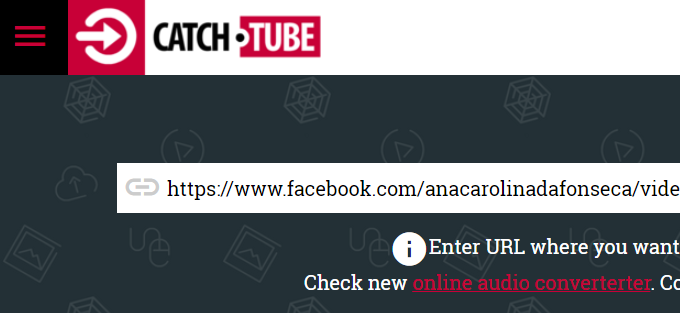
Some other video downloaders you can try include Catchvideo.cyberspace, Savethevideo.com, RipSave, and the Chrome extension Video Downloader.
Hack Your Browser To Download a Video
Every webpage is made upwards of code that you lot don't see unless you peer behind the scenes, and any video you watch is being streamed from a particular source. If you can observe the source link from within the code, you might be able to achieve a download link.
1 clear instance of where this works is with YouTube videos. Downloading videos from YouTube is a popular request and in that location are lots of tools that can practice it (many that charge), so you might be surprised to acquire that you can download whatsoever video from YouTube with aught more than a browser hack. Yous can also download entire YouTube playlists at once.
A desktop web browser loads YouTube videos differently than a mobile ane, and then the idea here is to tell your desktop browser to request the YouTube video as if you were on a mobile device. In one case your browser loads the page, a unique download link is visible, but simply if you uncover the source lawmaking of the page.
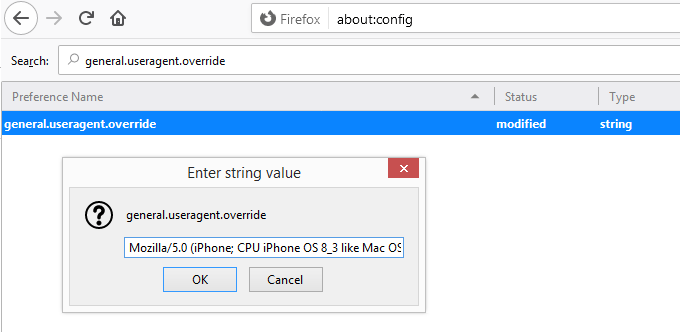
- Open up Firefox and go to about:config. Care for that like a URL, and so enter it into the navigation expanse at the top of the browser.
- Right-click in an empty infinite and go to New > String.
- Name information technology full general.useragent.override and then put this code there:
Mozilla/5.0 (iPhone; CPU iPhone Os 8_3 similar Mac Os X) AppleWebKit/600.one.4 (KHTML, like Gecko) FxiOS/one.0 Mobile/12F69 Safari/600.i.iv
- Open up a new tab and detect the YouTube video you want to download.
- Starting time the video and let it play for a few seconds. If in that location's an ad, permit that finish first.
- Right-click the video and choose Inspect Element.
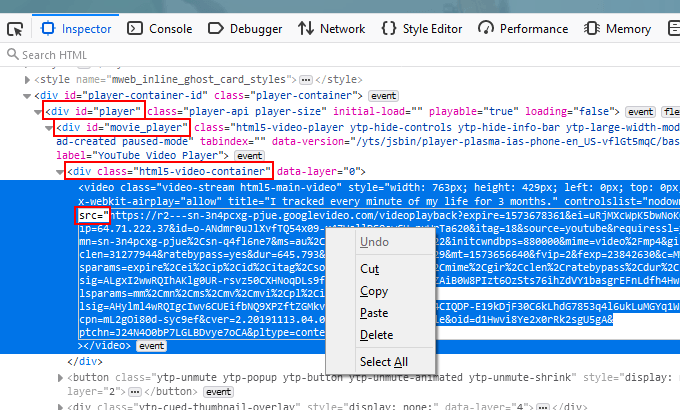
- In the new window that opens, find <div id="player" and click the arrow to its left to aggrandize it, and then do the same for <div id="movie_player" below it, and <div class="html5-video-container" beneath that.
- Below that is a long URL following src=". Double-click that to see the total URL, right-click it, and and then choose Copy.
- Open up a new tab in Firefox (or any browser) and enter that into the navigation bar.
- Right-click the video in that tab and choose Save Video As.
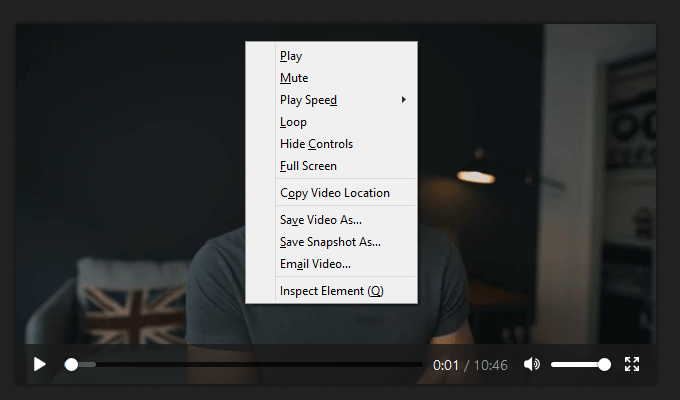
- Download videoplayback.mp4 to your computer to save the YouTube video. You tin rename it if you lot want.
- Return to the tab with the user agent setting, right-click the new string you lot made, and select Reset to return Firefox to desktop manner.
Here's another example where a CNN weather video has no download link on the surface, but if you lot plow Firefox into mobile mode and refresh the page, the source shows a simple MP4 download link.
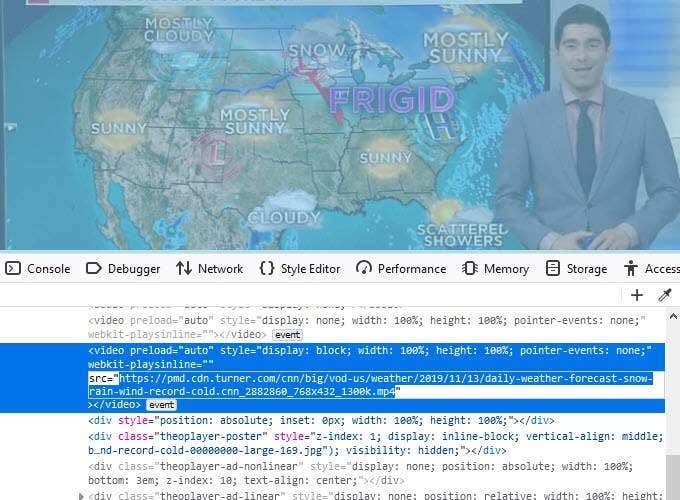
This exact technique to download a video won't work for every video on other websites get some video streaming services don't have mobile versions of their pages, but a similar method might work.
If inspecting the video page doesn't show a download link, try changing the browser's user agent similar we did above, then give it another shot. You might also accept luck using a different browser similar Chrome or Edge.
Do not share my Personal Information.
DOWNLOAD HERE
Posted by: maciashiculoveirs.blogspot.com

Post a Comment for "Best Way To Download Videos From Any Website UPDATED"